
MoonEyes
Metro Detective Agency Case ManagementA two-semester senior design capstone built for a real client. MoonEyes is a Windows desktop case management system that lets Metro Detective Agency investigators manage cases, subjects, clients, and agents through a centralized database — replacing paper filing cabinets with a structured, role-based application. The client formally accepted the delivered product.
MoonEyes is a three-tier application — WinForms frontend, ASP.NET Core API middleware, and MariaDB database — locally deployed on the client's Windows machine. The API and database both run as Windows services in the background — the WinForms app is a standard desktop executable that connects to the local API on launch. The client had a requirement for local hosting, so there is no cloud dependency. Other machines on the same network connect by pointing to the host's IP address.
UserControl pages
JWT token storage
Command / Query split
Entity Framework Core
Automated backups
Task Scheduler
Backend organization — the API is built around MediatR, giving each operation its own
self-contained handler class. An AddCase command, a GetCaseById query — each lives in isolation and talks directly to the Entity
Framework DbContext. Each request is a strongly typed class with an explicit
return type baked into its generic parameter, so the input/output contract is visible at the class
definition rather than buried inside a controller method. This keeps the codebase readable and avoids
the complexity of an additional repository layer, which EF already abstracts away adequately for this
scale.
public class AddCase
{
    // Response DTO lives alongside the command that produces it
    public class UserResponse
    {
        public string CaseNumber { get; set; }
    }

    public class Command : IRequest<UserResponse>
    {
        public int ClientId { get; set; }
        public string Name { get; set; }
        public string Purpose { get; set; }
        public List<int> UserIds { get; set; }
        public List<int> SubjectIds { get; set; }
    }

    public class Handler : IRequestHandler<Command, UserResponse>
    {
        private readonly MooneyesContext _db;

        public async Task<UserResponse> Handle(
            Command request, CancellationToken ct)
        {
            // Guarantee a unique case number
            string caseNumber;
            do { caseNumber = RandomStringGenerator.Generate(); }
            while (await _db.Investigationcases
                .AnyAsync(c => c.CaseNumber == caseNumber));

            var newCase = new Investigationcase {
                Name = request.Name,
                ClientId = request.ClientId,
                Purpose = request.Purpose,
                Status = "New",
                CaseNumber = caseNumber,
            };
            newCase.Users = await _db.Users
                .Where(u => request.UserIds.Contains(u.UserId))
                .ToListAsync();
            newCase.Subjects = await _db.Subjects
                .Where(s => request.SubjectIds.Contains(s.SubjectId))
                .ToListAsync();

            _db.Investigationcases.Add(newCase);
            _db.SaveChanges();
            return new UserResponse { CaseNumber = caseNumber };
        }
    }
}
public class FilterClient
{
    public class ClientResponse
    {
        public int ClientId { get; set; }
        public string Name { get; set; }
        public string? Email { get; set; }
        // ... other fields
    }

    public class Command : IRequest<List<ClientResponse>>
    {
        public string? Name { get; set; }
        public string? Email { get; set; }
        public string? Company { get; set; }
        // ... other optional filter fields
    }

    public class Handler : IRequestHandler<Command, List<ClientResponse>>
    {
        public async Task<List<ClientResponse>> Handle(
            Command request, CancellationToken ct)
        {
            // Build query conditionally — only filter on
            // fields the caller actually provided
            IQueryable<Client> query = _db.Clients;

            if (!string.IsNullOrWhiteSpace(request.Name))
                query = query.Where(c =>
                    c.Name.ToLower().Contains(request.Name.ToLower()));

            if (!string.IsNullOrWhiteSpace(request.Email))
                query = query.Where(c =>
                    c.Email.ToLower().Contains(request.Email.ToLower()));

            return await query.Select(c => new ClientResponse {
                ClientId = c.ClientId,
                Name = c.Name,
                Email = c.Email,
            }).ToListAsync();
        }
    }
}
Authentication Authentication uses JWT with a short-lived access token (10 minutes) and a longer-lived refresh token (10 days). Both are signed with separate keys — access tokens carry UserId and Role claims, refresh tokens carry only UserId — so a compromised access token cannot be used to forge a refresh. On every API call the client checks the token expiry with a 15-second buffer and silently exchanges the refresh token for a new pair if needed, so the user is never interrupted mid-session. Revoking access is immediate at the role level — a user marked DLT is rejected on their next refresh attempt, and their session dies within 10 minutes as the access token naturally expires. Role claims are also used to drive the UI directly — controls restricted to admins are hidden entirely from agent accounts. Passwords are hashed with a unique salt per user before storage — plain text passwords are never written to the database.
Pages as components — every screen in MoonEyes is a UserControl that implements the IPage interface.
Rather than navigating between separate Forms, one main Form acts as a shell and pages are swapped in
and out dynamically. This is the WinForms equivalent of component-based UI — each page is
self-contained, composable, and independently testable.
Layout uses the full WinForms toolkit — Dock (Top,
Bottom, Fill), Anchor, FlowLayoutPanel, TableLayoutPanel, and AutoSize — to build a properly
responsive interface without hardcoded pixel coordinates. This is non-trivial in WinForms and prevents
the layout from breaking when users resize the window.
Undo / Redo navigation — IPage requires each page to
implement Clone(), which is the key to how navigation history works. The
history is a bounded collection of IPage instances (max 10). Undo and Redo
simply move an index pointer and restore the existing instance — preserving state like filter results or
partially filled fields exactly as the user left them.
Refresh is handled differently: it calls Clone() to
create a fresh instance, which re-fetches live data from the API. Stateless pages like CaseFilterPage clone with no parameters. Stateful pages like ViewCasePage store their caseId as a field and pass
it into the constructor on clone — so the refreshed page knows exactly what to reload.
results loaded → View Case
caseId stored
results preserved ✓ ← View Case
Clone(caseId) → fresh data
public interface IPage
{
    // Each page must implement Clone() so the
    // navigation system can refresh it with live
    // data while preserving its parameters
    IPage Clone();
}

// Stateless page — no parameters needed
public IPage Clone()
    => new CaseFilterPage();

// Stateful page — carries its ID on clone
public IPage Clone()
    => new ViewCasePage(CaseId);
public static void RefreshPage()
{
    if (Instance.CurrentIndex >= 0)
    {
        IPage current =
            Instance.PageHistory[Instance.CurrentIndex];

        // Clone() re-fetches live data using
        // stored parameters (e.g. CaseId)
        IPage fresh = current.Clone();
        (fresh as Control).Dock =
            DockStyle.Fill;

        Instance.PageHistory[Instance.CurrentIndex]
            = fresh;
        Instance.page.Controls.Clear();
        Instance.page.Controls.Add(fresh as Control);
    }
}
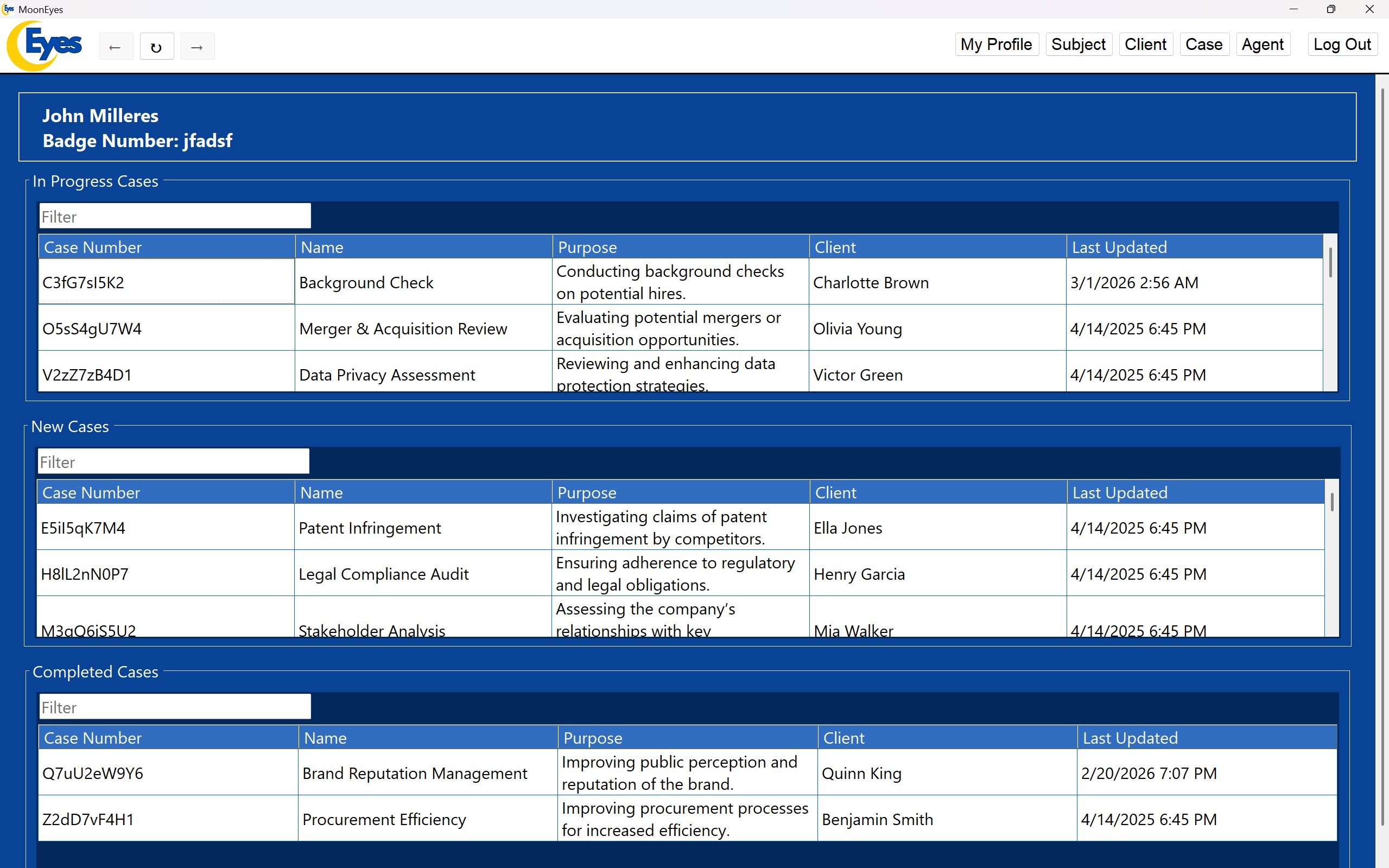
The core of MoonEyes is case management — creating and tracking investigation cases with their linked clients, subjects, and agents. Each case has three sub-sections: timestamped agent reports, file uploads (photos and documents), and GPS location entries. Cases move through a status lifecycle from new through in progress and completed, with a soft-delete DLT status rather than permanent removal.
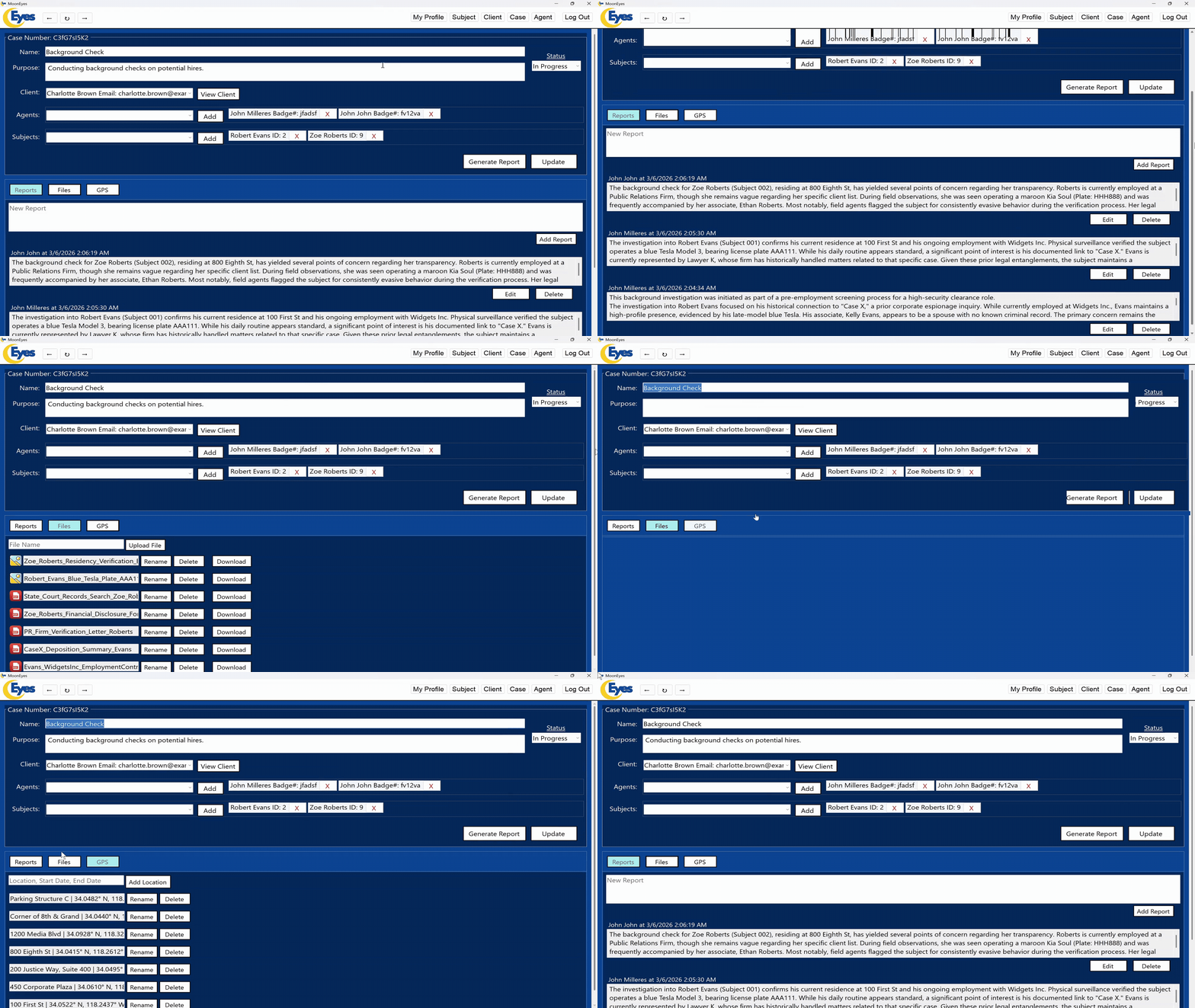
Role-based access— JWT role claims control what each user can see and do. Admin accounts can create agents, change passwords, and modify or delete any report. Regular agents can view all cases but can only edit their own reports. Sensitive endpoints such as agent creation verify the role claim server-side — restricted controls are also hidden entirely from agent accounts in the UI rather than just disabled.
PDF report generation — from any case page, agents can generate a formatted PDF containing all case details — subject profiles, agent reports, client information, and case metadata — in a single document. This was one of the primary deliverables the client requested, replacing the agency's existing process of manually assembling paper case files.
The generated report pulls together every linked record into a structured document — case details, client profile, gps locations, subject profiles with photos, and all agent reports ordered from newest to oldest. Built with MigraDoc, the output is a standard PDF saved directly to the agent's device.
MoonEyes was run as a professional software project with a full documentation pipeline alongside the codebase. Every major phase of the project had a corresponding technical document — from requirements gathering through design, quality assurance, risk management, and test planning.